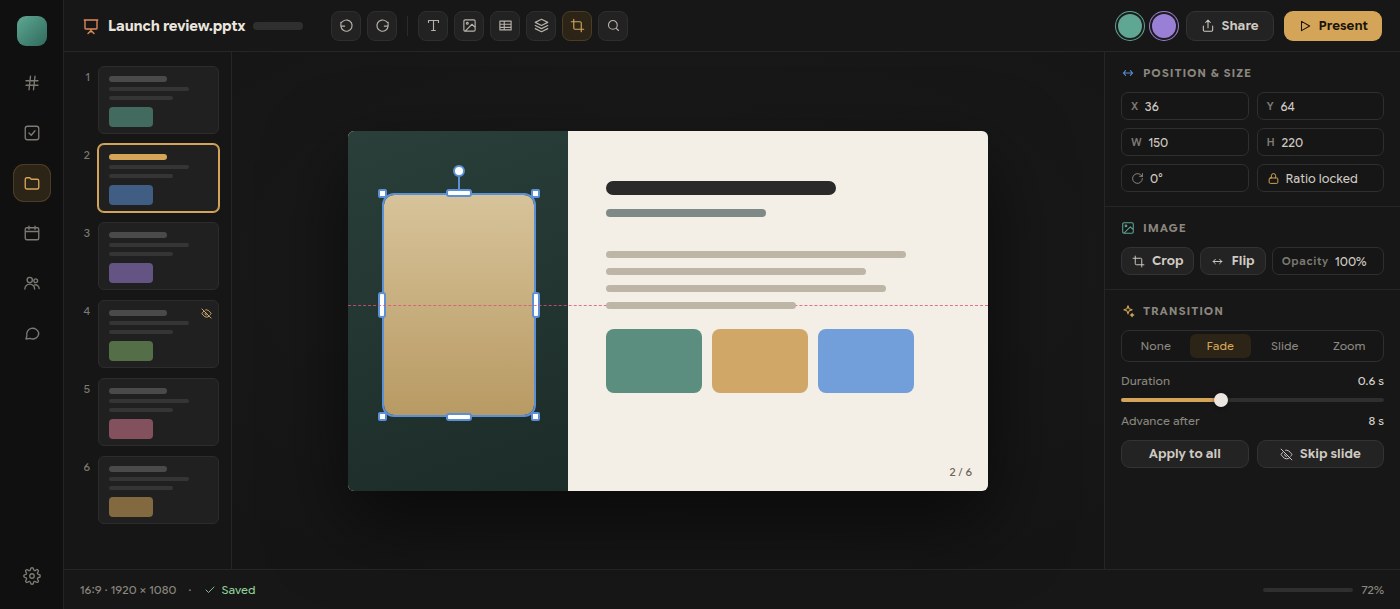
The presentation editor in Polybase has grown into a full slide tool. New slides land after the active one, slides can be multi-selected, reordered together, viewed in a grid and skipped during the show, and the page size can be 16:9, 4:3, 16:10 or a custom pixel size. Objects get exact position, size and rotation fields, layer ordering and edge resize handles; images can be cropped, flipped and made translucent; find and replace works across every text box.
Transitions carry a duration, a direction and an optional auto-advance, and can be applied to every slide at once. Presenter view adds click-to-advance, keyboard shortcuts, a black or white screen and resizable speaker notes with a pausable timer. Tables are now edited natively, with rows, columns and merged cells, and imported PowerPoint tables keep their full text, formatting and proportions.
Saving is designed for interruptions. Typing autosaves with a visible state, unsent changes are kept on the device and can be restored, and undo runs through one shared deck history. Exporting back to PPTX retains crop, flip, hidden slides and transition settings; PDF export embeds every font face used in the deck and shows its progress.
- Multi-select, grid overview, skipped slides and custom page sizes
- Exact position, size, rotation and layer controls with edge handles
- Image crop, flip and opacity; find and replace across slides
- Native table editing with full PPTX table fidelity
- Draft recovery, shared undo history and faithful PPTX and PDF export