7 Notion alternatives
Find the right home for docs, databases and team knowledge.
Compare team knowledge bases, documents that run processes and local notes. Check hosting, licensing and migration before choosing, including our own product.
Editorial update: 19 October 2026
What should your next tool do better?
When choosing a Notion alternative, decide whether you need a shared team wiki, structured databases or personal notes. An editor that suits one of those jobs may not suit the others.
If you need a self-hosted Notion alternative, check the deployment and licence separately. This guide compares seven tools, including Polybase, our own product. The cards explain their fit and limitations.
A different tool for a different need
Start with your requirements, then compare the trade-offs.
Compare at a glance
| Explore the options | Best for | What to check |
|---|---|---|
| Coda | Ops-minded teams that want to build lightweight internal tools out of documents. | No self-hosting, and the power concentrates with the makers — docs can grow into apps that only a few people can maintain. |
| AppFlowy | Individuals and teams that want the Notion model as open source, on their own terms. | A young project that moves fast; collaboration features and the ecosystem are still maturing compared to the incumbents. |
| Outline | Teams that want a self-hosted, no-nonsense wiki and are comfortable operating it. | The licence restricts commercial document services for third parties. Self-hosting also requires configuring authentication, storage and maintenance. |
| Slite | Remote teams that want a low-friction, docs-only knowledge base. | No self-hosting, and by design no chat, tasks or calls — the rest of your stack stays exactly where it is. |
| Confluence | Jira-centric organisations that want documentation in the same vendor family. | New customers cannot buy Data Center subscriptions. End of life is scheduled for 28 March 2029; existing customers should review the migration timeline and any approved exceptions. |
| PolybaseOur product | Teams whose Notion wiki drifts stale because chat, tasks and meetings live in other tools — and organisations that need a self-hosted knowledge base. | A young product: Notion's editor and template ecosystem run deeper, SOC 2 and ISO 27001 are on the roadmap rather than held. |
| Obsidian | Individuals who want durable, portable notes under their full control. | Real-time team editing, permissions and a shared source of truth aren't the model — it earns its place here as a different philosophy, not a drop-in team wiki. |
The seven contenders.
- Product website
Coda
Docs that behave like apps
Coda blends documents with database tables, buttons and automations — 'docs as apps' — so a single doc can run a process, not just describe it. Its pricing is unusual in a good way: only Doc Makers pay; editors and viewers don't.
- Best for
- Ops-minded teams that want to build lightweight internal tools out of documents.
- Hosting model
- SaaS only.
- What to check
- No self-hosting, and the power concentrates with the makers — docs can grow into apps that only a few people can maintain.
- Product website
AppFlowy
The open-source Notion re-imagining
AppFlowy is an open-source Notion alternative built in Rust and Flutter — local-first, with an optional self-hostable cloud for sync and collaboration. It reproduces the Notion feel — blocks, databases, kanban — under your own control.
- Best for
- Individuals and teams that want the Notion model as open source, on their own terms.
- Hosting model
- Local-first apps; self-hostable AppFlowy Cloud for sync.
- What to check
- A young project that moves fast; collaboration features and the ecosystem are still maturing compared to the incumbents.
- Product website
Outline
A source-available team wiki
Outline is a team wiki with a Markdown-friendly editor and search, available as a hosted service or on your infrastructure. Its code is published under Business Source License 1.1; this is source-available, not an open-source licence.
- Best for
- Teams that want a self-hosted, no-nonsense wiki and are comfortable operating it.
- Hosting model
- Self-hosted under BSL, or Outline’s hosted cloud.
- What to check
- The licence restricts commercial document services for third parties. Self-hosting also requires configuring authentication, storage and maintenance.
- Product website
Slite
Deliberately docs-only, for remote teams
Slite is a focused documentation tool for remote teams: a clean editor, a tidy knowledge-base structure, and AI-assisted answers on top of your docs. It deliberately does one thing well instead of trying to be an everything-app.
- Best for
- Remote teams that want a low-friction, docs-only knowledge base.
- Hosting model
- SaaS only.
- What to check
- No self-hosting, and by design no chat, tasks or calls — the rest of your stack stays exactly where it is.
- Product website
Confluence
The Atlassian wiki, Jira's neighbour
Confluence is Atlassian’s team wiki, integrated with Jira. It offers Atlassian Cloud; existing customers can continue self-managed Data Center deployments during the announced wind-down.
- Best for
- Jira-centric organisations that want documentation in the same vendor family.
- Hosting model
- Atlassian Cloud or self-managed Data Center.
- What to check
- New customers cannot buy Data Center subscriptions. End of life is scheduled for 28 March 2029; existing customers should review the migration timeline and any approved exceptions.
- Product website
Polybase
Our productThe sovereign team workspace
Polybase keeps shared text editing, presence, version history and comments alongside a channel’s chat and tasks. Native documents, wiki pages and already-imported DOCX content support shared editing on web and desktop. It offers EU-region cloud, private VPC and self-hosted deployments. Core is €10 per user/month, with optional add-ons.
Full disclosure: Polybase is our product. Read this entry as the maker's perspective — the caveat below is as real as everyone else's.
- Best for
- Teams whose Notion wiki drifts stale because chat, tasks and meetings live in other tools — and organisations that need a self-hosted knowledge base.
- Hosting model
- EU cloud, private VPC, or self-hosted / air-gapped.
- What to check
- A young product: Notion's editor and template ecosystem run deeper, SOC 2 and ISO 27001 are on the roadmap rather than held.
- Product website
Obsidian
Local-first notes you own outright
Obsidian is the local-first outlier: Markdown files on your own disk, linked notes, a graph view and a huge plugin ecosystem. It is a personal knowledge tool first — many teams use it, but through shared vaults and sync rather than a server.
- Best for
- Individuals who want durable, portable notes under their full control.
- Hosting model
- Local files on your device; optional paid sync, or bring your own.
- What to check
- Real-time team editing, permissions and a shared source of truth aren't the model — it earns its place here as a different philosophy, not a drop-in team wiki.
Five questions worth asking before you switch.
- 01
Where does your knowledge live?
An internal wiki is some of your most sensitive data. Cloud-only, or can you run it on your own servers — in your region, under your keys?
- 02
Does the wiki live next to the work?
Docs in one silo, chat in another is how wikis go stale. The closer writing sits to the discussion that produced it, the longer it stays true.
- 03
How structured does it need to be?
Some teams need pages; some need databases with typed columns and linked records. Tools differ sharply on the structured half.
- 04
What are your exit options?
Markdown export, CSV export and open formats decide how hard leaving will be later. Ask before you pour three years of knowledge in.
- 05
Who tends it on day two?
Every knowledge base needs a gardener — and self-hosted ones need an operator too. Budget for both, or the tool won't matter.
Start with your requirements, then compare the trade-offs.
Self-hosting, source availability and data residency
AppFlowy is the open-source option on this list. Outline publishes its code under Business Source License 1.1, which is source-available rather than open source and restricts commercial document services for third parties. Polybase is commercial software with a self-hosting option.
A hosted provider’s data-residency setting changes where covered data is stored; self-hosting changes who operates the deployment. Check backups, identity providers and external dependencies in either case. Confluence Data Center is winding down: new customers cannot buy subscriptions, with end of life scheduled for 28 March 2029.
Test a Notion migration with representative pages
Notion exports Markdown and CSV. Use a small sample containing page links, attachments and databases to check what the target tool preserves. Confirm permissions and version history separately; an export file alone does not establish a complete migration.
Polybase supports DOCX import and CSV import into Tables. There is no guided Notion importer today. Migration assistance is available during onboarding; automated importers remain on the roadmap.
Where Polybase fits
You are reading this list on our site, so here is the part vendors usually skip.
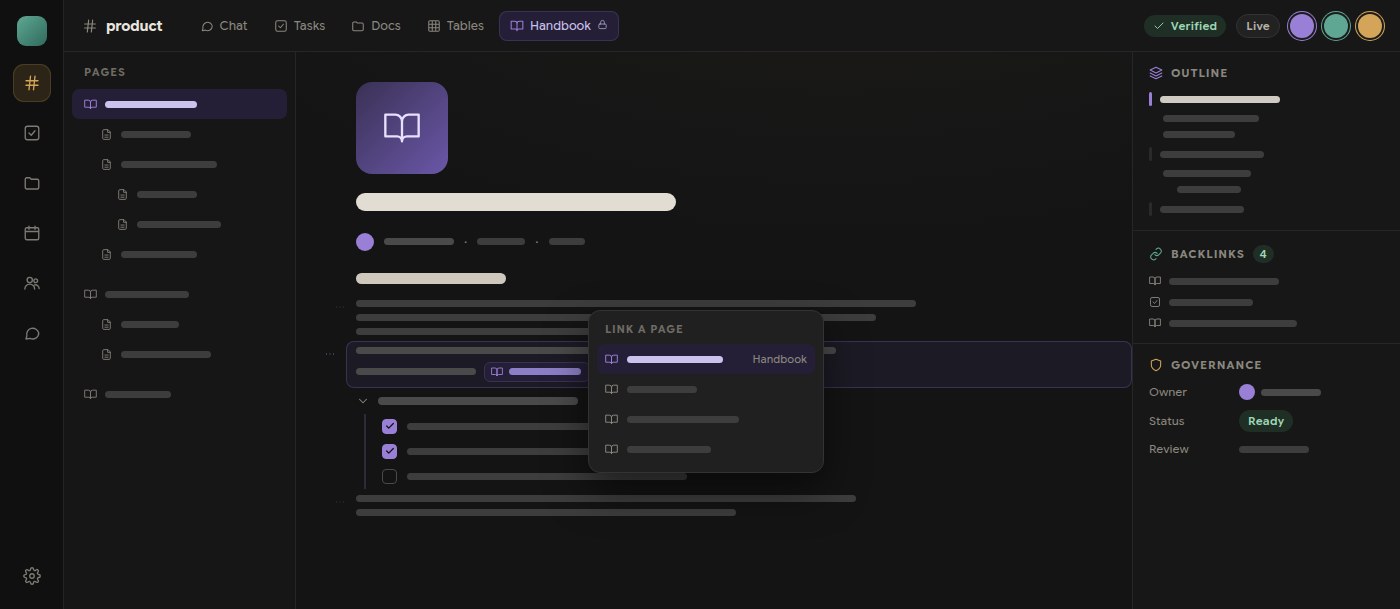
When it fits
Docs next to the conversation
Documents live in the channel where the discussion, tasks and calls already are — the decision gets written where it was made, and stays findable.
A wiki you can self-host
EU-region cloud, your own VPC, or air-gapped self-host — your servers, your keys. Notion does not offer a self-hosted option today.
Structured data alongside docs
Polybase Tables is an optional add-on for typed columns, formulas, lookups and linked records in the same channels as your docs.
Plain pricing
Core is €10 per user/month, with optional add-ons — instead of a docs bill plus a chat bill plus a meetings bill.
AI with the full picture
Bring your own model — Anthropic, OpenAI, Gemini or self-hosted via Ollama. The assistant sees docs, chat and tables as one context, and your content isn't used to train foundation models.
What to check
Editor depth and templates
Notion's synced blocks and template ecosystem run deeper. Polybase covers the everyday core — blocks, comments, version history, file viewers with OCR, DOCX import, PDF and Markdown export.
Certifications
Not certified yet — SOC 2 and ISO 27001 are on our roadmap. We answer security questionnaires and architecture questions today.
Enterprise sign-on
Tenant administrators can configure OIDC SSO providers and SCIM 2.0 provisioning. Test provider setup, verified-domain account mapping and sign-in policies in your deployment. Native SAML support is not included.
Importers and native apps
No guided Notion importer yet — we offer migration assistance during onboarding, with automated importers on the roadmap. Desktop and mobile apps are available.
Choosing a Notion alternative.
What is the best Notion alternative in 2026?
Choose by the job: AppFlowy for an open-source blocks-and-databases model; Outline for a dedicated self-hosted wiki under BSL; Confluence for Atlassian documentation; Coda for process-oriented docs; Obsidian for local personal notes. Polybase connects team docs with chat and tasks and offers self-hosting.
Which Notion alternatives are open source?
AppFlowy is open source. Outline is source-available under Business Source License 1.1, not open source. Obsidian and Polybase are not open source; local storage or self-hosting does not change their licences.
Can we import our Notion pages?
Notion exports Markdown and CSV. Test page links, attachments and databases before migrating. Polybase supports DOCX import and CSV import into Tables, with migration assistance during onboarding. A guided Notion importer is not available today.
Why does self-hosting a wiki matter?
Self-hosting gives your organisation control over the deployment and data location. It also means owning backups, updates and access configuration. Check each tool’s licence and dependencies; self-hosting is not automatic compliance.
What does Polybase cost compared to Notion?
Polybase Core is €10 per user/month, with optional add-ons such as Canvas, Email, Tables and AI. Whether that beats your Notion bill depends on what sits around it — if Notion plus Slack plus Zoom is carrying one team today, consolidation is where the saving comes from. A demo walks through your actual stack.
Documentation and primary sources
Licence, hosting and export details checked on 14 October 2026. Verify the edition and terms before migrating.
- Outline licence
- AppFlowy source and licence
- Notion export formats
- Notion data residency
- Atlassian Data Center timeline
- Polybase document features
Product names identify the tools being compared. No endorsement is implied.
See Polybase next to Notion, feature by feature.
Book a 30-minute demo and we'll map your wiki and its satellite tools onto one workspace — or start with the detailed side-by-side comparison.
Continue your research
Compare another part of your team's toolkit.
Confluence
A team wiki your people can keep useful.
Read the guideSlack
Team conversations, with a deployment you can choose.
Read the guideMicrosoft Teams
Compare chat, meetings and the tools around them.
Read the guideMicrosoft 365
Choose who operates your office suite and where data lives.
Read the guide