6 Airtable alternatives
Structured data, with the right amount of structure.
Hosting models, what each tool genuinely does best, and one honest caveat apiece — including for our own product, which is on the list and clearly labelled.
Editorial update: 19 October 2026
What should your next tool do better?
Airtable made databases feel friendly — and then the record links started piling up in Slack, the automations hit their plan limits, and someone in compliance pointed out that all of it lives in US-jurisdiction cloud, with no self-host option today. Structured data is often the most sensitive data a team has: customers, pipelines, HR lists.
This guide compares six real alternatives for structured data and table tools. One of them is our own product; we say so on its card and apply the same honest-caveat rule to it as to everyone else.
A different tool for a different need
Start with your requirements, then compare the trade-offs.
Compare at a glance
| Explore the options | Best for | What to check |
|---|---|---|
| Baserow | Teams that want an Airtable-like database from an EU vendor, cloud or self-hosted. | Open core: some advanced features are reserved for premium and enterprise editions, and the template and integration ecosystem is smaller than Airtable's. |
| NocoDB | Technical teams that want a spreadsheet UI over databases they already run. | Check the Sustainable Use License and edition limits, particularly commercial service use, external database connections and access management. Self-hosting still requires backups, updates and an operator. |
| Grist | Data-minded teams that hit the ceiling of normal formulas and want real control. | The spreadsheet-plus-Python approach appeals most to technical users, and the ecosystem around it is comparatively small. |
| SeaTable | European organisations that want spreadsheet-style databases with an EU vendor and a self-host path. | Less widely known than Airtable, and a number of capabilities are reserved for the paid editions. |
| PolybaseOur product | Teams tired of pasting record links into chat, and organisations that need structured data on infrastructure they control. | As a pure database Airtable runs deeper — more field types, interface designer — and Tables is a €10 per-user add-on on top of Core (€10); SOC 2 and ISO 27001 are on the roadmap, not held. |
| monday.com | Teams that want visual work management more than a true relational database. | Cloud only, per-seat tiers add up, and it is not a relational database — linked records and data rigour take real effort. |
The six contenders.
- Product website
Baserow
Open-source no-code database from Amsterdam
Baserow is an open-source no-code database built in the Netherlands — a clean, browser-based grid with forms, views and an API, self-hostable or hosted. For teams that want an Airtable-style tool under European jurisdiction, it is one of the most direct answers.
- Best for
- Teams that want an Airtable-like database from an EU vendor, cloud or self-hosted.
- Hosting model
- Self-hosted (open source) or Baserow's hosted cloud.
- What to check
- Open core: some advanced features are reserved for premium and enterprise editions, and the template and integration ecosystem is smaller than Airtable's.
- Product website
NocoDB
Source-available tables and database interfaces
NocoDB provides a spreadsheet-style interface with views, forms and APIs, with hosted and self-hosted deployments. Its current Sustainable Use License is source-available rather than an OSI open-source licence. Check the chosen edition for external database connections and administration features.
- Best for
- Technical teams that want a spreadsheet UI over databases they already run.
- Hosting model
- Self-hosted (Docker) or NocoDB's hosted cloud.
- What to check
- Check the Sustainable Use License and edition limits, particularly commercial service use, external database connections and access management. Self-hosting still requires backups, updates and an operator.
- Product website
Grist
Spreadsheet-database hybrid with Python formulas
Grist is a spreadsheet-database hybrid with an open-source core and a distinctive superpower: formulas written in Python. Data structuring is rigorous, access rules are fine-grained, and the core engine can run on your own servers.
- Best for
- Data-minded teams that hit the ceiling of normal formulas and want real control.
- Hosting model
- Self-hosted (open-source core) or Grist's hosted cloud.
- What to check
- The spreadsheet-plus-Python approach appeals most to technical users, and the ecosystem around it is comparatively small.
- Product website
SeaTable
Excel-flavoured tables, made in Germany
SeaTable comes from the team behind Seafile in Germany and reads like an Excel-flavoured Airtable: rows, rich column types, automations and scripts, offered as EU-hosted cloud or self-hosted editions.
- Best for
- European organisations that want spreadsheet-style databases with an EU vendor and a self-host path.
- Hosting model
- SeaTable Cloud (EU-hosted) or self-hosted editions.
- What to check
- Less widely known than Airtable, and a number of capabilities are reserved for the paid editions.
- Product website
Polybase
Our productThe sovereign team workspace
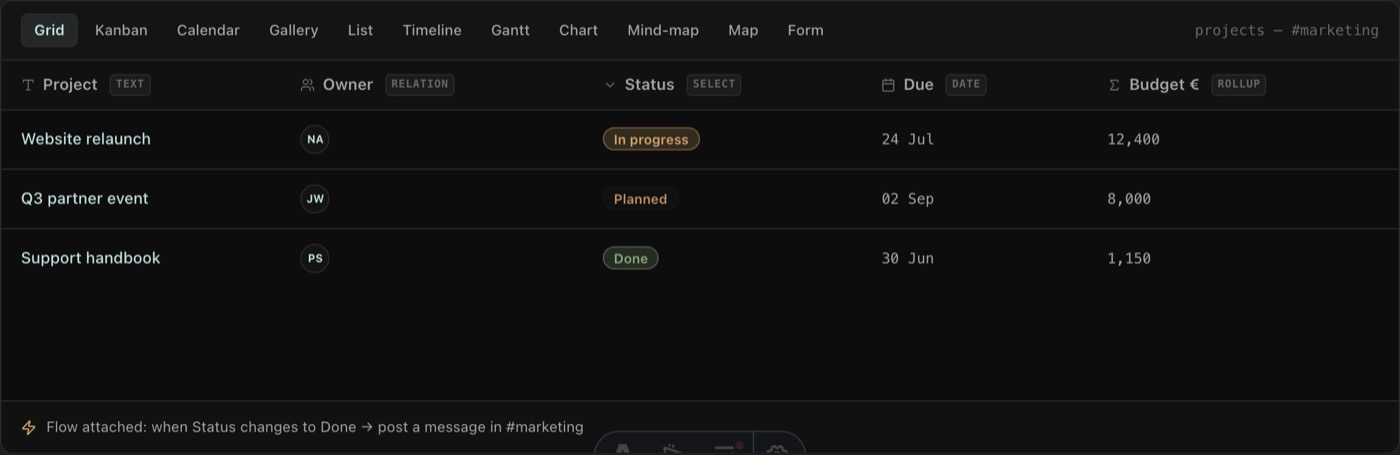
Polybase Tables give every channel an Airtable-style database — typed columns, formulas, lookups, linked records, kanban views, forms and CSV import — living next to the chat, tasks, documents and calls about the same work. Flows automate what happens when a row changes, and discussing a record means posting in the channel, not pasting a link into another app. The workspace runs as EU-region cloud, in your own VPC, or fully self-hosted including air-gapped setups.
Full disclosure: Polybase is our product. Read this entry as the maker's perspective — the caveat below is as real as everyone else's.
- Best for
- Teams tired of pasting record links into chat, and organisations that need structured data on infrastructure they control.
- Hosting model
- EU cloud, private VPC, or self-hosted / air-gapped.
- What to check
- As a pure database Airtable runs deeper — more field types, interface designer — and Tables is a €10 per-user add-on on top of Core (€10); SOC 2 and ISO 27001 are on the roadmap, not held.
- Product website
monday.com
Work management with database-ish boards
monday.com is the colourful heavyweight of this list — technically a work OS built on flexible boards rather than a pure relational database. If what you actually need is visual work management with some structured data on the side, it is a polished, well-supported option.
- Best for
- Teams that want visual work management more than a true relational database.
- Hosting model
- SaaS only.
- What to check
- Cloud only, per-seat tiers add up, and it is not a relational database — linked records and data rigour take real effort.
Five questions worth asking before you switch.
- 01
Where do your records live?
Tables tend to hold customer, pipeline and HR data. US cloud only, or can you keep it in the EU — or on your own servers, under your keys?
- 02
Database or work management?
Some tools are true relational databases; others are boards with database-ish features. Know which one you actually need.
- 03
Where does the conversation happen?
If every record discussion is a link pasted into chat, context leaks. The closer the table sits to the team's conversation, the less gets lost.
- 04
What do automations really cost?
Metered automation runs make the bill grow with your success. Check what's included before you build your processes on it.
- 05
What are your exit options?
CSV export, real APIs and open-source editions decide how hard leaving will be later. Structured data deserves a structured exit.
Where Polybase fits
You are reading this list on our site, so here is the part vendors usually skip.
When it fits
Tables inside the workspace
The database lives in the channel where your team already chats, assigns tasks and holds calls about that data — discussing a record means posting, not pasting a link.
Your records, your servers
Self-hosting lets your team choose and operate the infrastructure, storage and encryption keys. Review provider access, external services and legal requirements separately.
Automation as part of the platform
Flows trigger on rows, messages and schedules, with conditions, loops and actions — visual workflow automation on infrastructure you can run yourself.
Plain pricing
Core is €10 per user/month and Tables is a clearly priced €10 add-on — instead of a database bill plus a chat bill plus a meetings bill.
AI with the whole context
Bring your own model — Anthropic, OpenAI, Gemini or self-hosted via Ollama. The assistant works across tables, conversations and documents as one context, and your content isn't used to train foundation models.
What to check
Pure-database depth
Airtable has more field types, an interface designer and a large template gallery. Polybase Tables cover the working core — typed columns, formulas, lookups, linked records, forms, CSV import and multiple views.
Certifications
Not certified yet — SOC 2 and ISO 27001 are on our roadmap. We answer security questionnaires and architecture questions today.
Enterprise sign-on
Tenant administrators can configure OIDC SSO providers and SCIM 2.0 provisioning. Test provider setup, verified-domain account mapping and sign-in policies in your deployment. Native SAML support is not included.
Importers and native apps
CSV import works today, but there is no guided Airtable importer yet — we offer migration assistance during onboarding, with automated importers on the roadmap. Desktop and mobile apps are available.
Choosing an Airtable alternative.
What is the best Airtable alternative in 2026?
For open-source database tools, consider Baserow and Grist. NocoDB is source-available under its Sustainable Use License. SeaTable offers hosted and self-hosted editions. monday.com focuses on work management. Polybase Tables fits teams that want structured records beside channel chat and tasks; compare the add-on price and migration requirements.
Which Airtable alternatives are open source?
Baserow and Grist have open-source editions you can self-host. NocoDB uses a source-available Sustainable Use License; it should not be counted as OSI open source. SeaTable and Polybase also offer self-hosting under their respective terms. Check the edition and licence separately from the hosting model.
Can we import our Airtable bases?
Every tool on this list can work from Airtable's per-table CSV exports. In Polybase, CSVs import into Tables and you rebuild column types, formulas, lookups and linked records in the column editor. We offer migration assistance during onboarding; automated importers are on our roadmap.
Is there an EU or self-host answer to Airtable?
Yes, several. Baserow is built in the Netherlands, SeaTable in Germany, and both offer EU hosting and self-hosting. NocoDB and Grist self-host anywhere. Polybase adds the workspace angle: EU cloud or self-host, with the tables living next to the team's chat, tasks and calls.
What does Polybase cost compared to Airtable?
Polybase Core is €10 per user/month, and Tables is a €10 per-user add-on — both stated plainly. Whether that beats your Airtable bill depends on what sits around it: if Airtable plus Slack plus Zoom is carrying one team, consolidation is where the saving comes from. A demo walks through your actual stack.
Documentation and primary sources
Editorial update: 19 October 2026
- Baserow
- NocoDB
- Grist
- SeaTable
- Polybase
- monday.com
- NocoDB: Sustainable Use License
- NocoDB: edition and plan limits
Product names identify the tools being compared. No endorsement is implied.
See Polybase next to Airtable, feature by feature.
Book a 30-minute demo and we'll map your bases onto tables inside one workspace — or start with the detailed side-by-side comparison.
Continue your research
Compare another part of your team's toolkit.
Slack
Team conversations, with a deployment you can choose.
Read the guideMicrosoft Teams
Compare chat, meetings and the tools around them.
Read the guideMicrosoft 365
Choose who operates your office suite and where data lives.
Read the guideSelf-hosted Slack
Run team messaging on infrastructure you operate.
Read the guide