6 Google Drive alternatives
Choose where files live and how your team shares them.
Hosting models, what each tool genuinely does best, and one honest caveat apiece — including for our own product, which is on the list and clearly labelled.
Editorial update: 19 October 2026
What should your next tool do better?
Google Drive is the default file layer of Google Workspace, and it earned that spot: a real-time office suite, generous sharing, search that works. But the default comes with a structural fact — your organisation's entire file canon lives in Google's US-jurisdiction cloud, and there is no self-host path today.
There is a second, quieter problem: a drive is a place files go to be stored, not a place work happens. The folder tree knows nothing about the discussion, the task or the decision each file belongs to.
This guide compares six real alternatives for team file storage. One of them is our own product; we say so on its card and apply the same honest-caveat rule to it as to everyone else.
A different tool for a different need
Start with your requirements, then compare the trade-offs.
Compare at a glance
| Explore the options | Best for | What to check |
|---|---|---|
| Nextcloud | Organisations that want a full, self-hosted Drive replacement — sync clients included — under their own control. | It is a platform you operate, not a service you subscribe to: updates, tuning and the varying polish of its app ecosystem are your responsibility. |
| Microsoft OneDrive | Organisations using Microsoft 365 that want file sync and Office collaboration; check the chosen plan and any Teams licence separately. | No self-hosted edition of the modern service, and the value assumes the Microsoft ecosystem — sharing and admin sprawl across OneDrive and SharePoint takes real effort to govern. |
| Dropbox | Teams that work from desktop folders across supported platforms and want managed file sync and sharing. | No self-hosting, and it is a file product at heart — its workspace ambitions never quite displaced the folder — so chat, tasks and docs still live in other tools. |
| Box | Enterprises in regulated industries that need governance, retention and audited external collaboration. | No self-hosting, and the enterprise focus shows — for a small team, its governance machinery can be more than the storage problem calls for. |
| Seafile | Teams that want fast, no-frills self-hosted file sync and are happy to keep collaboration tools separate. | Deliberately focused on sync — sharing UI, integrations and community are leaner than Nextcloud's, and some features sit in the paid Pro edition. |
| PolybaseOur product | Teams whose files are work artefacts — briefs, contracts, specs — and organisations that want the file layer on infrastructure they control. | Not a general-purpose sync client for your desktop — files live in the workspace, not in a mirrored folder — and while docs, viewers and imports are strong, office-suite editing depth is not Google Docs. |
The six contenders.
- Product website
Nextcloud
The open-source file cloud
Nextcloud combines self-hosted file sync and sharing with desktop and mobile clients. Nextcloud Office adds collaborative editing, while other apps cover calendars and communication. Assess the required apps, administration and support for your deployment.
- Best for
- Organisations that want a full, self-hosted Drive replacement — sync clients included — under their own control.
- Hosting model
- Self-hosted (open source); managed hosting available from many providers.
- What to check
- It is a platform you operate, not a service you subscribe to: updates, tuning and the varying polish of its app ecosystem are your responsibility.
- Product website
Microsoft OneDrive
The Microsoft 365 file layer
OneDrive is Drive's mirror image in the Microsoft world: bundled with Microsoft 365, wired into Office, Teams and SharePoint, with mature sync clients on every desktop. If your organisation already runs on Outlook and Office, your files are probably halfway there.
- Best for
- Organisations using Microsoft 365 that want file sync and Office collaboration; check the chosen plan and any Teams licence separately.
- Hosting model
- Microsoft cloud only.
- What to check
- No self-hosted edition of the modern service, and the value assumes the Microsoft ecosystem — sharing and admin sprawl across OneDrive and SharePoint takes real effort to govern.
- Product website
Dropbox
Desktop sync, perfected
Dropbox provides hosted file sync and sharing with desktop and mobile clients, version history and collaboration features. Test sync behaviour with representative files and compare storage, recovery and administration limits on the intended plan.
- Best for
- Teams that work from desktop folders across supported platforms and want managed file sync and sharing.
- Hosting model
- Dropbox cloud only (US vendor).
- What to check
- No self-hosting, and it is a file product at heart — its workspace ambitions never quite displaced the folder — so chat, tasks and docs still live in other tools.
- Product website
Box
Content management for the enterprise
Box aims above storage at enterprise content management: governance policies, retention, approval workflows, granular external collaboration and a long list of compliance attestations. Regulated industries pick it precisely for the paperwork around the files.
- Best for
- Enterprises in regulated industries that need governance, retention and audited external collaboration.
- Hosting model
- Box cloud only (US vendor).
- What to check
- No self-hosting, and the enterprise focus shows — for a small team, its governance machinery can be more than the storage problem calls for.
- Product website
Seafile
Lean, fast, self-hosted sync
Seafile focuses on file synchronisation and sharing using libraries, with self-hosted Community and Professional editions. It supports encrypted libraries, subject to feature and edition limits. Test your files, clients and collaboration requirements before selecting the deployment.
- Best for
- Teams that want fast, no-frills self-hosted file sync and are happy to keep collaboration tools separate.
- Hosting model
- Self-hosted (open source core); Pro edition and hosted offering available.
- What to check
- Deliberately focused on sync — sharing UI, integrations and community are leaner than Nextcloud's, and some features sit in the paid Pro edition.
- Product website
Polybase
Our productThe sovereign team workspace
Polybase organises Drive files within team channels alongside chat, tasks and documents. It includes file previews, OCR-assisted text extraction and full-text search. Access uses server-enforced policies and configurable roles, with signed links for external sharing. Deployments include EU-region cloud, private VPC and self-hosting.
Full disclosure: Polybase is our product. Read this entry as the maker's perspective — the caveat below is as real as everyone else's.
- Best for
- Teams whose files are work artefacts — briefs, contracts, specs — and organisations that want the file layer on infrastructure they control.
- Hosting model
- EU cloud, private VPC, or self-hosted / air-gapped.
- What to check
- Not a general-purpose sync client for your desktop — files live in the workspace, not in a mirrored folder — and while docs, viewers and imports are strong, office-suite editing depth is not Google Docs.
Five questions worth asking before you switch.
- 01
Who ultimately holds your files?
A file store is your organisation's memory. If it must live on your infrastructure — or at least in your jurisdiction — most household names drop off the list immediately.
- 02
Are files next to the work, or in a separate silo?
A standalone drive stores the file but forgets its context. Files that live with the discussion, tasks and decisions that produced them are far easier to find and trust.
- 03
What happens when you share externally?
Anyone-with-the-link is convenient and unaccountable. Look for expiring, revocable links — and for whether you can see what happened after you hit share.
- 04
Do you need a desktop sync client?
If your team lives in Finder and Explorer, folder sync is non-negotiable and narrows the field. If work happens in the browser anyway, sync matters less than you think.
- 05
What does the bill reward?
Per-user storage quotas, pooled tiers, upgrade cliffs when one team hoards video files — check how the pricing behaves when your data grows.
Where Polybase fits
You are reading this list on our site, so here is the part vendors usually skip.
When it fits
Files live where the work is
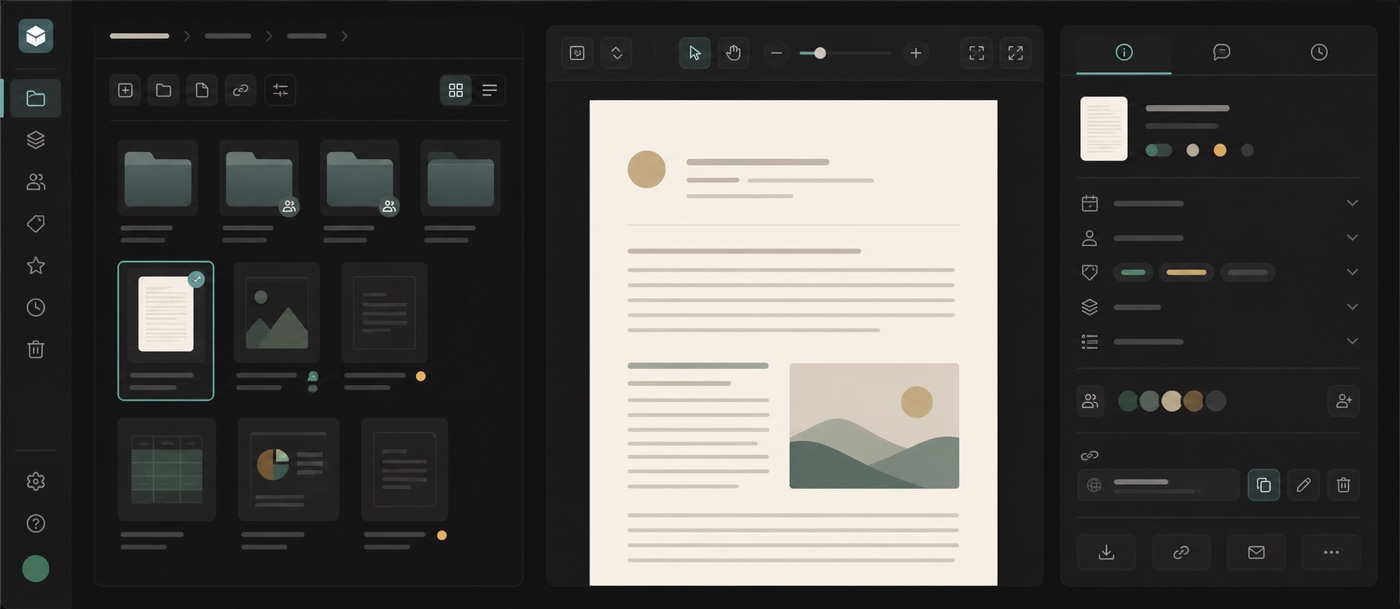
A file lands in the channel where it was discussed, next to the thread, the task and the doc it belongs to. Previews for PDF, DOCX, XLSX and PPTX plus OCR-fed full-text search mean finding it later doesn't depend on remembering a folder path.
Sharing you can account for
External sharing uses signed, revocable share tokens rather than bare public URLs, and shared document links report per-page view analytics — you see which pages were actually read, not just that a link went out.
A file layer you can self-host
EU-region cloud, your own VPC, or fully air-gapped self-host. Google does not offer a self-hosted Drive today; here it is the headline deployment mode.
Permissions with one spine
The server enforces access policies and configurable roles for files, chat, tasks and documents. Protected file fields and signed share links provide additional controls. PostgreSQL row-level security is an optional tenant-isolation backstop, not the primary access check.
Plain pricing
Drive is part of Core at €10 per user/month with 5 GB per user, alongside chat, tasks, calls and automation — the file layer comes with the workspace instead of being a separate subscription.
What to check
Desktop folder sync
Polybase is not a general-purpose sync client: there is no mirrored folder on your desktop. Files are uploaded, previewed and shared in the workspace — if Finder-level sync is a hard requirement, Dropbox, OneDrive, Nextcloud or Seafile serve it better today.
Office-suite editing depth
Polybase docs offer conflict-free co-editing with per-block locking and presence, and office files get viewers with OCR, DOCX import and PDF/MD export — but Google Docs and Sheets remain deeper as an editing suite. Heavy spreadsheet teams will keep one around.
Storage headroom
Core includes 5 GB per user. That covers work documents comfortably; if your team stores large video or design archives, plan capacity with us rather than assuming Google-scale pooled storage.
Certifications
Not certified yet — SOC 2 and ISO 27001 are on our roadmap. We answer security questionnaires and architecture questions today.
Identity and sign-in setup
Tenant administrators can configure OIDC SSO providers and SCIM 2.0 provisioning. Test provider setup, verified-domain account mapping and sign-in policies in your deployment. Native SAML support is not included.
Choosing a Google Drive alternative.
What is the best Google Drive alternative in 2026?
Choose by the job: Nextcloud for self-hosted file collaboration, Seafile for library-based sync, Dropbox for managed folder sync, Box for content governance, and OneDrive for Microsoft 365 file workflows. Polybase keeps project files beside channel discussions and tasks, but has no general-purpose desktop folder sync. Test office editing, external sharing and migration separately.
Which Google Drive alternatives can be self-hosted?
Nextcloud and Seafile are open source and fully self-hostable. Polybase self-hosts too — from a private VPC down to air-gapped deployments on your own servers. Google Drive, Dropbox, Box and OneDrive are cloud-only: none of them offers a self-host path today.
Does Polybase have a desktop sync client like Drive for desktop?
No. Polybase is not a folder that mirrors to your desktop — files live inside channels in the workspace, uploaded and previewed in the browser or installable PWA. If continuous folder sync is a hard requirement, Nextcloud, Seafile, Dropbox or OneDrive are the honest answers; some teams pair one of them with Polybase as the collaboration layer.
Can Polybase replace Google Docs and Sheets for editing?
Partly. Polybase docs are a block editor with conflict-free co-editing — per-block locking and presence — plus version history, comments and full-text search, and office files get viewers with OCR, DOCX import and PDF/MD export. But it is not character-level co-editing, and there is no native spreadsheet suite at Google Sheets depth — for structured data many teams use Polybase Tables instead, and keep an office suite for heavy spreadsheets.
How does external file sharing work in Polybase?
External sharing uses signed links that can be revoked. Workspace access follows server-enforced policies and configurable roles. Test a share with a permitted reader, an unauthorised user and a revoked link before relying on it for sensitive files.
What does Polybase cost compared to Google Drive?
Drive is included in Polybase Core at €10 per user/month with 5 GB per user, together with chat, tasks, calls and automation. Google Workspace bundles more storage; Polybase bundles more workspace. Whether it beats your bill depends on what else it replaces — a demo walks through your actual stack. Self-hosted and enterprise deployments are priced individually.
See Polybase next to Google Drive, feature by feature.
Book a 30-minute demo and we'll show a file shared from a channel — signed link, page-level analytics and all — or start with the detailed side-by-side comparison.
Continue your research
Compare another part of your team's toolkit.
Google Shared Drives
Keep team files accessible when people and projects change.
Read the guideSlack
Team conversations, with a deployment you can choose.
Read the guideMicrosoft Teams
Compare chat, meetings and the tools around them.
Read the guideMicrosoft 365
Choose who operates your office suite and where data lives.
Read the guide