7 Confluence alternatives
A team wiki your people can keep useful.
Compare wiki and documentation tools by deployment, licence and migration effort. Find options for European teams, from EU-region cloud to infrastructure you operate.
Editorial update: 19 October 2026
What should your next tool do better?
Looking for a Confluence alternative means deciding what must survive the switch: page structure, permissions, Jira workflows or control of the servers. This guide compares Polybase, Notion, Outline, BookStack, XWiki, SharePoint and GitBook for those different needs, rather than assuming every wiki is interchangeable.
Confluence Server support ended on 15 February 2024. Confluence Data Center is also on an end-of-life path: new-customer sales ended on 30 March 2026 and end of life is scheduled for 28 March 2029. We cover the implications below, alongside self-hosted licensing and migration checks. Polybase is our product and is labelled throughout.
A different tool for a different need
Start with your requirements, then compare the trade-offs.
Compare at a glance
| Explore the options | Best for | What to check |
|---|---|---|
| Outline | Teams that want a dedicated modern wiki and can meet the licence and operating requirements of their chosen edition. | Review BSL use restrictions and which features require a paid plan. Self-hosting includes operating PostgreSQL, Redis and file storage; tasks, chat and calls remain separate tools. |
| Notion | Teams that want flexible docs plus lightweight databases in one polished cloud tool. | No self-hosting, and flexibility cuts both ways: big workspaces drift into disorder without real curation discipline, and the deeper you build on its databases, the harder it becomes to leave. |
| BookStack | Small and mid-sized teams that want dependable self-hosted documentation with minimal operations work. | The fixed shelf–book–chapter hierarchy is opinionated, there is no real-time co-editing today, and the writing experience is plainer than modern block editors — by design, but plainer. |
| XWiki | Teams that need a configurable wiki and can maintain its database, files, authentication and extensions. | Plan extension compatibility and maintenance. Page exports, including XAR archives, do not replace a complete instance backup and restore test. |
| SharePoint | Microsoft-oriented organisations needing an intranet and document libraries, with administrators to configure access and governance. | Powerful but heavy: making SharePoint feel like a pleasant wiki takes real configuration work and admin ownership, and the day-to-day editing experience trails modern block editors. |
| PolybaseOur product | Teams whose documentation should live next to the conversations and tasks that produce it, and organisations that want the wiki on infrastructure they control. | No macro or plugin marketplace — Confluence's app ecosystem has no equivalent here — and import/export is still maturing: DOCX in, PDF and Markdown out, no automated Confluence importer yet. |
| GitBook | Developer-facing product docs and public knowledge bases with a publishing workflow. | Built for curated, published documentation more than a sprawling internal wiki, and per-user pricing adds up once everyone in the company needs edit access. |
The seven contenders.
- Product website
Outline
The modern, source-available knowledge base
Outline is a Markdown-friendly team knowledge base with real-time editing and a clean reading experience. It offers hosted cloud and self-hosted editions. Its current source is published under BSL 1.1, a source-available licence rather than an open-source licence.
- Best for
- Teams that want a dedicated modern wiki and can meet the licence and operating requirements of their chosen edition.
- Hosting model
- Hosted cloud, or self-hosted under BSL/commercial terms.
- What to check
- Review BSL use restrictions and which features require a paid plan. Self-hosting includes operating PostgreSQL, Redis and file storage; tasks, chat and calls remain separate tools.
- Product website
Notion
The all-in-one docs-and-databases workspace
Notion turned documents, wikis and lightweight databases into one flexible block-based canvas, with a huge template ecosystem and a heavy AI push. For teams that want their knowledge base and their trackers in the same flexible tool, it redefined the category Confluence used to own.
- Best for
- Teams that want flexible docs plus lightweight databases in one polished cloud tool.
- Hosting model
- SaaS only.
- What to check
- No self-hosting, and flexibility cuts both ways: big workspaces drift into disorder without real curation discipline, and the deeper you build on its databases, the harder it becomes to leave.
- Product website
BookStack
The straightforward open-source wiki
BookStack is a free, MIT-licensed wiki that organises content the way a library does: shelves, books, chapters, pages. It is a simple PHP application that runs happily on modest hardware, which has made it a quiet favourite for internal documentation and IT teams.
- Best for
- Small and mid-sized teams that want dependable self-hosted documentation with minimal operations work.
- Hosting model
- Self-hosted (open source); managed hosting available via third parties.
- What to check
- The fixed shelf–book–chapter hierarchy is opinionated, there is no real-time co-editing today, and the writing experience is plainer than modern block editors — by design, but plainer.
- Product website
XWiki
An open-source wiki platform you can operate yourself
XWiki is a self-hostable wiki platform. Its platform code uses LGPL 2.1; default wiki content and additional extensions have their own licensing. LDAP and OpenID Connect authenticators are available as extensions, with deployment and account mapping to configure.
- Best for
- Teams that need a configurable wiki and can maintain its database, files, authentication and extensions.
- Hosting model
- Self-hosted wiki platform.
- What to check
- Plan extension compatibility and maintenance. Page exports, including XAR archives, do not replace a complete instance backup and restore test.
- Product website
Polybase
Our productThe sovereign team workspace
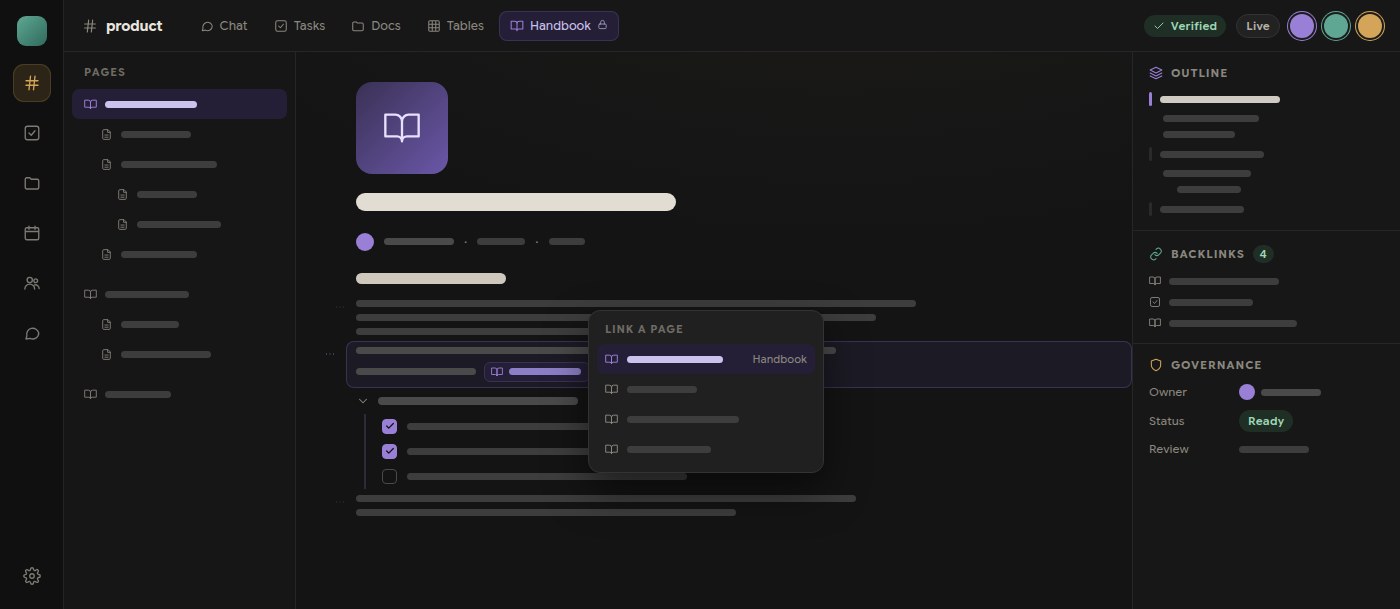
Polybase places channel Docs beside the Chat, Tasks and Calls of the same project, with shared text editing on web/Electron, presence, version history, comments and full-text search. Newly uploaded DOCX files first use the import/edit/save flow; pages export to PDF and Markdown, while viewers and OCR make file content searchable. It can run fully offline; calls require a self-hosted LiveKit media server inside the same network.
Full disclosure: Polybase is our product. Read this entry as the maker's perspective — the caveat below is as real as everyone else's.
- Best for
- Teams whose documentation should live next to the conversations and tasks that produce it, and organisations that want the wiki on infrastructure they control.
- Hosting model
- EU cloud, private VPC, or self-hosted / air-gapped.
- What to check
- No macro or plugin marketplace — Confluence's app ecosystem has no equivalent here — and import/export is still maturing: DOCX in, PDF and Markdown out, no automated Confluence importer yet.
- Product website
GitBook
Polished docs, wired to Git
GitBook is a documentation platform loved for product and API docs: Git sync, branch-based change requests, and publishing that looks good out of the box. If your documentation is curated content with an audience — customers, developers, the public — it shows.
- Best for
- Developer-facing product docs and public knowledge bases with a publishing workflow.
- Hosting model
- Cloud workspace; the published-content renderer can be self-hosted, while editing and content management remain hosted.
- What to check
- Built for curated, published documentation more than a sprawling internal wiki, and per-user pricing adds up once everyone in the company needs edit access.
Five questions worth asking before you switch.
- 01
Wiki next to the work, or a separate silo?
Keeping docs beside the chat, tasks and calls that produced them gives teams useful context for maintenance. Agree who reviews each page and when it needs updating.
- 02
Can you actually self-host it?
Check the licence, edition and lifecycle, alongside the servers. Confluence Data Center has a published end-of-life date; alternative self-hosted deployments still need an owner for upgrades, identity, backups and recovery.
- 03
How does editing feel in 2026?
Test a page your team edits every day: tables, comments, concurrent changes and navigation. Use the same content in each editor so you can compare the work of writing and maintaining it.
- 04
Can you get your content out again?
Import is how you arrive; export is how you stay free to leave. Look at the formats each tool reads and writes before you pour years of knowledge into it.
- 05
What does the bill do as you grow?
Per-user tiers, enterprise-only editions, and marketplace apps that are themselves priced per user across the whole site — model the total cost at next year's headcount, not today's.
Start with your requirements, then compare the trade-offs.
Self-hosted Confluence alternatives after Data Center
For Confluence Data Center, existing customers can buy new subscriptions and expansions until 30 March 2028; Atlassian schedules subscriptions and associated apps to become read-only at end of life on 28 March 2029. Build a migration schedule around your content and app dependencies, rather than treating Data Center as an indefinite self-hosted destination.
Self-hosted and open source describe different things. BookStack uses the MIT licence. Outline publishes its source under BSL 1.1, whose current terms restrict offering it as a commercial document service to third parties. Polybase offers self-hosted deployments under commercial terms. Compare the licence, required features, authentication and operating costs before choosing.
For European teams: hosting region and operational control
An EU hosting region answers a location question; it does not establish the provider’s ownership or place every data category in that region. Confluence Cloud offers residency for defined in-scope data, and Notion offers residency to eligible Enterprise workspaces with its own exclusions. Review account data, integrations, support access and the contracted service separately.
Polybase offers EU-region cloud hosting, private VPC and self-hosted deployment. With self-hosting, your team selects and operates the infrastructure, PostgreSQL backups and file storage. Plan patching, monitoring and restoration as part of the decision. Fully offline calls require a self-hosted LiveKit media server inside the same network.
A practical migration from Confluence
Start with a representative space: ordinary pages, nested pages, tables, attachments, internal links, macros and restricted content. Confluence Cloud supports page exports to Word or PDF and space exports in several formats, each with limits. An export is an input for migration testing, not evidence that another tool preserves permissions, history or app behaviour.
Polybase supports DOCX import and PDF/Markdown export, but has no automated Confluence importer today. Validate that exported Word content can be converted to a usable DOCX file, then check formatting, links and attachments in a pilot. Recreate permissions and macro-dependent workflows explicitly; keep the original export and agree how archived history remains accessible. Migration assistance is available during onboarding.
Validate identity and access before choosing a self-hosted wiki
BookStack supports OIDC as a primary login method; its documented account mapping uses an external identity, not an automatic email match. XWiki offers LDAP and OIDC authenticators as extensions. Test existing-account mapping, default roles and removal of a departing user with the identity provider you intend to use.
Polybase currently supports email/password, magic links, authenticator-app MFA and passkeys in supported browsers. Tenant administrators can configure OIDC SSO providers and SCIM 2.0 provisioning. Test provider setup, verified-domain account mapping and sign-in policies in your deployment. Native SAML support is not included. If federation or automatic provisioning is mandatory, treat that as a selection requirement before planning the migration.
Compare recovery responsibilities, not just export formats
For BookStack, back up the database, uploads and instance configuration; retain the original APP_KEY when restoring. XWiki needs an instance backup that covers its database, permanent data and configuration. Self-hosted Polybase operators manage PostgreSQL backups and uploaded files on a volume or S3-compatible storage. Restore a test instance and verify restricted readers, attachments and identity mapping.
BookStack offers HTML, PDF, text, Markdown and Portable ZIP exports; these are content transfer formats, not a complete backup. XWiki exports PDF/HTML and XAR archives, but an XAR alone is not a full instance backup. Similarly, Polybase PDF/Markdown export does not preserve an entire deployment. Choose separate procedures for moving reviewed content and recovering the running service.
Where Polybase fits
You are reading this list on our site, so here is the part vendors usually skip.
When it fits
Docs live where the work happens
Every channel has docs right next to its chat, tasks and calls. The decision gets made, becomes a task, and gets documented in the same place — no separate wiki drifting out of date.
An editor from this decade
Shared text editing on web/Electron, presence, version history, comments and full-text search help teams maintain their pages together. Newly uploaded DOCX files first go through import/edit/save; shared native mobile editing is not included.
Operate on your own infrastructure
Self-hosted deployment is available through Docker Compose, including fully offline setups. Calls use a self-hosted LiveKit media server inside the same network. Self-hosted and enterprise pricing is custom; include administration in the comparison.
Search that reads your files too
Full-text search covers docs, and built-in viewers for PDF, DOCX, XLSX and PPTX extract text with OCR — so the knowledge trapped in scanned attachments becomes findable instead of invisible.
Plain pricing
Core is €10 per user/month, with optional add-ons — and no marketplace of per-user-priced apps quietly multiplying the bill as your site grows.
What to check
Macros and apps
Confluence's marketplace of macros and apps has no equivalent in Polybase. There is a REST API, an MCP server, GitHub and HubSpot connectors and Flows automation — but a macro-heavy Confluence setup will not map one-to-one.
Import and export maturity
Today: DOCX import, PDF and Markdown export. There is no automated Confluence importer yet — we offer migration assistance during onboarding, and automated importers are on the roadmap.
Certifications
Not certified yet — SOC 2 and ISO 27001 are on our roadmap. We answer security questionnaires and architecture questions today.
Enterprise sign-on
Tenant administrators can configure OIDC SSO providers and SCIM 2.0 provisioning. Test provider setup, verified-domain account mapping and sign-in policies in your deployment. Native SAML support is not included.
Choosing a Confluence alternative.
What is the best Confluence alternative in 2026?
It depends on your binding constraint. A modern self-hostable wiki: Outline. Simple, dependable open-source documentation: BookStack. A configurable wiki platform with authenticator extensions: XWiki. Already deep in Microsoft 365: SharePoint. Flexible cloud docs plus databases: Notion. Published product docs: GitBook. Docs living beside the chat, tasks and calls that produce them, self-hostable at any size: that is the case Polybase is built for — we're biased, so read the side-by-side comparison too.
Which Confluence alternatives can be self-hosted?
Polybase, Outline, BookStack, XWiki and SharePoint Server offer self-hosted deployments, under different licences and operating models. Outline uses BSL 1.1 source-available terms; BookStack is MIT open source. Polybase supports offline deployment with a self-hosted LiveKit server for calls. GitBook’s published renderer can be hosted separately, but that does not self-host its editing workspace; Notion is a cloud workspace.
Can a new customer buy self-hosted Confluence in 2026?
Confluence Server support ended on 15 February 2024. New customers could no longer buy Confluence Data Center from 30 March 2026; existing-customer purchases and expansions end on 30 March 2028, with end of life on 28 March 2029. Evaluate Confluence Cloud or a replacement now, and pilot the content, permissions and Marketplace app workflows before choosing a migration path.
Can I import my Confluence pages into Polybase?
There is no automated Confluence importer today. Polybase imports DOCX and we provide migration assistance during onboarding; automated importers are on the roadmap. PDF and Markdown exports help move reviewed page content, but they do not replace history, permissions or full-instance backups. Plan those separately.
Does Polybase have macros and plugins like Confluence?
No — there is no macro or app marketplace, and if your Confluence value lives in specific marketplace apps, check for equivalents before switching. What Polybase offers instead: a REST API, per-channel scoped API keys, an MCP server that works with Claude, Cursor and ChatGPT, GitHub and HubSpot connectors, and Flows for visual workflow automation.
What does Polybase cost compared to Confluence?
Polybase Core is €10 per user/month, with optional add-ons such as Canvas, Email, Tables and AI; self-hosted and enterprise deployments are custom — talk to us. Note that Confluence's sticker price is rarely the whole bill: marketplace apps are typically priced per user across the entire site. Whether Polybase beats your total depends on what else it replaces — a demo walks through your actual stack.
Documentation and primary sources
Sources reviewed on 14 October 2026. Check edition and plan details before purchasing.
- Atlassian: Server support dates
- Atlassian: Data Center sales and end of life
- Atlassian: data residency scope
- Atlassian: Confluence Cloud exports
- Outline: current BSL licence
- Outline: self-hosted dependencies
- BookStack: MIT licence and project FAQ
- Notion: Enterprise data residency
- Microsoft: SharePoint Server deployment
- GitBook: published renderer self-hosting
- BookStack: database, files and configuration backups
- BookStack: OIDC account mapping
- BookStack: exports and Portable ZIP
- XWiki: platform and content licences
- XWiki: authenticator choices
- XWiki: full-instance backup and restore
- XWiki: export formats and limits
- Polybase: Confluence migration checklist
Product names identify the tools being compared. No endorsement is implied.
See Polybase next to Confluence, feature by feature.
Book a 30-minute demo and we'll show a doc born in a channel, next to the chat and tasks it came from — or start with the detailed side-by-side comparison.
Continue your research
Compare another part of your team's toolkit.
Notion
Find the right home for docs, databases and team knowledge.
Read the guideSlack
Team conversations, with a deployment you can choose.
Read the guideMicrosoft Teams
Compare chat, meetings and the tools around them.
Read the guideMicrosoft 365
Choose who operates your office suite and where data lives.
Read the guide