4 Google Shared Drives alternatives
Keep team files accessible when people and projects change.
Compare four approaches to team files. Start with ownership, access boundaries and staff departures, then test sharing, migration and recovery.
Editorial update: 19 October 2026
What should your next tool do better?
Looking for Google Team Drives alternatives? Google renamed Team Drives to Shared Drives in 2019. Their defining feature is organisational ownership: team files remain when a contributor leaves. A replacement needs more than a folder that several people can open.
This guide focuses on shared-drive governance: who administers an area, where permissions stop, what an external collaborator can reach and what happens during offboarding. General file-sync comparisons answer a different question.
Polybase is our product and one of the four alternatives below. We explain its channel-based Drive model and limits alongside SharePoint document libraries, Nextcloud Team Folders and Seafile libraries.
A different tool for a different need
Start with your requirements, then compare the trade-offs.
Compare at a glance
| Explore the options | Best fit | What to check |
|---|---|---|
| Seafile | Teams that want library-based sharing and desktop sync, with a defined owner for every library. | A shared library is not automatically an organisation-owned Google Shared Drive. Validate ownership transfer and offboarding, and check which permissions need Professional. |
| PolybaseOur product | Teams that want project files, discussion and tasks under one server-enforced access model, with a self-host option. | No general-purpose desktop folder sync or automatic Google Shared Drives importer. Plan personal-file handling and offboarding explicitly; do not assume Google Docs feature parity. |
| Microsoft SharePoint | Organisations already using Microsoft 365 that want team-site document libraries. | A personal OneDrive folder is not a team library. Review site membership, file-level exceptions and guest access rather than treating a folder move as a permissions migration. |
| Nextcloud Team Folders | Organisations that want centrally managed team folders on a Nextcloud installation. | Overlapping memberships matter: advanced rules can combine allow and deny differently from your existing drive. Test effective access and maintain the server, app and backup plan. |
Four alternatives with different governance models.
- Product website
Seafile
Shared libraries with file sync
Libraries have an owner and can be shared with users or groups as read-only or read-write. Cascading subfolder permissions are a Professional feature. The Community server core uses AGPLv3; the Seahub interface uses Apache License 2.0.
- Best fit
- Teams that want library-based sharing and desktop sync, with a defined owner for every library.
- Hosting
- Self-hosted Community or Professional server.
- What to check
- A shared library is not automatically an organisation-owned Google Shared Drive. Validate ownership transfer and offboarding, and check which permissions need Professional.
- Product website
Polybase
Our productThe sovereign team workspace
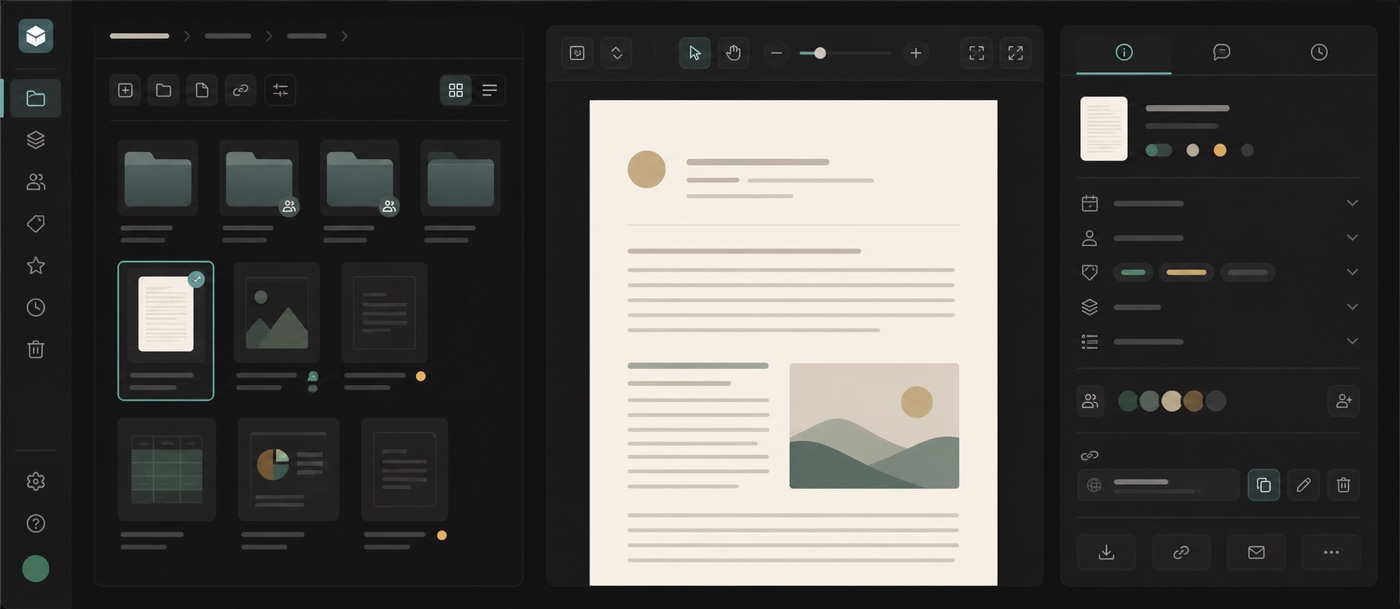
A channel can have a stable managed Drive folder, keeping files with its conversations and tasks. Its Drive lists readable content from that channel and accessible descendant areas, including explicit shares. Navigation placement does not grant access to a private child channel.
Polybase is our product. This is the maker's perspective; the limits below are part of the comparison.
- Best fit
- Teams that want project files, discussion and tasks under one server-enforced access model, with a self-host option.
- Hosting
- EU-region cloud, private VPC or self-hosted.
- What to check
- No general-purpose desktop folder sync or automatic Google Shared Drives importer. Plan personal-file handling and offboarding explicitly; do not assume Google Docs feature parity.
Nextcloud Team Folders
Administrator-managed shared folders
The Team Folders app, published as groupfolders, assigns shared folders to groups or teams. Advanced permissions can control read, write, create, delete and share rights on files and folders. The app declares AGPL-3.0-or-later licensing.
- Best fit
- Organisations that want centrally managed team folders on a Nextcloud installation.
- Hosting
- Self-hosted Nextcloud or a managed Nextcloud provider.
- What to check
- Overlapping memberships matter: advanced rules can combine allow and deny differently from your existing drive. Test effective access and maintain the server, app and backup plan.
Four questions a shared-drive replacement must answer.
- 01
Who is responsible after the creator leaves?
Separate the file creator from the team administrator. Test contributor removal, reassignment of administration and continued access for the remaining team.
- 02
Where do permissions inherit or stop?
Use an ordinary project folder and a restricted area. Check direct grants, group membership and inherited access before accepting the effective permissions.
- 03
How does external access end?
Distinguish guest accounts, direct grants and share links. Removing a staff member does not replace reviewing the access routes they created.
- 04
Can you restore content and access together?
Agree retention and recovery responsibilities. A version-history screen does not prove a restored workspace has the correct permissions.
Start with your requirements, then compare the trade-offs.
Test private subteams and explicit sharing before migration
Create a project area with a general folder and a restricted finance area. Use separate accounts for an administrator, contributor, reader and person outside the project. Record who can discover, open, edit, move and share each file; repeat after changing membership.
In Polybase, a private child channel stays private when its Drive folder appears beneath a broader project in navigation. A parent Drive lists only readable descendant content; explicit shares retain their access rules. Neither visual placement nor the parent listing grants extra authority. Disable and re-enable Drive in a pilot: the managed folder and its location are reused, and disabling does not delete its files.
Offboarding needs an access inventory and a restore test
Before removing a contributor, distinguish team files from personal files and identify another administrator for each shared area. Remove the departing person's memberships and direct grants, review guest access and revoke unneeded links. Test with both the departed account and a remaining contributor.
Document backup ownership, scope and recovery targets. For self-hosted Polybase, operators manage PostgreSQL backups and uploaded files on a volume or S3-compatible storage. There is no built-in backup service. Restore both parts in an isolated environment and check documents, permissions and explicit shares; version history alone is not a backup plan.
Run a shared-drive migration pilot with acceptance criteria
Start with one shared drive. Inventory folders, contributors, restricted areas, external grants and links. Export representative files, establish target team areas and map roles deliberately. Keep the source available during validation; do not assume old URLs, comments or revision history will carry into another product.
Include a collaborative document, XLSX workbook, PDF and externally shared file. Test opening and editing, external-access revocation, contributor removal and backup recovery. Approve another batch only when intended readers retain access and restricted content remains restricted.
Plan Polybase onboarding assistance and manual work rather than an automated Google Shared Drives importer. Tenant administrators can configure OIDC SSO and SCIM 2.0; test provider setup, account mapping and sign-in policies in your deployment. Native SAML, general-purpose desktop folder sync and exact Google Docs feature parity are not included. If any is mandatory, establish fit before changing your team’s file system.
Where Polybase fits
Evaluate today's work and deployment model with your own sample teams and files.
When it fits
Files keep their project context
Channel Drive areas keep files beside discussion and tasks. Readable descendant areas can appear together while retaining each channel's access rules.
Control the deployment
Choose EU-region cloud, a private VPC or your own servers. Self-hosting includes responsibility for updates, database operations and file storage.
What to check
Migration and identity provisioning
There is no automated Google Shared Drives importer. Plan migration assistance and manual content checks. Tenant administrators can configure OIDC SSO and SCIM 2.0; validate account mapping, provisioning and access removal. Native SAML is not supported.
Desktop sync and office compatibility
Polybase does not mirror a general-purpose desktop folder or promise full Google Docs and Sheets compatibility. Test your real documents and workbooks.
Backup operations
Self-hosted deployments need an operator-owned backup and restore plan for the database and uploaded files. File version history does not replace it.
Questions about replacing Google Shared Drives.
Are Google Team Drives and Shared Drives different products?
Team Drives is the old name; Google renamed it Shared Drives in 2019. This guide covers shared team storage and access administration, rather than personal cloud folders.
Which Google Shared Drives alternatives can be self-hosted?
Polybase, Nextcloud with Team Folders, and Seafile offer self-hosted paths. Compare team access as well as hosting: your own server still needs administrators, updates, backups and tested offboarding.
Does a Polybase Drive folder under another channel expose its files?
Navigation position does not grant access to a private child channel. The parent's Drive lists only readable descendant content, and explicit shares retain their permissions. Test with reader accounts before migration.
Does Polybase automatically take over all files when somebody leaves?
Do not assume an organisation-wide automatic transfer. Put team material in the intended channel areas, inventory personal files and direct grants, and agree an offboarding process. Review share-link access separately.
Can migration preserve every link and edit history?
Verify that for each source, format and destination. Copying content does not establish equivalent permissions, working old URLs or imported collaboration history. Polybase does not promise an automated Google Shared Drives importer.
Documentation and primary sources
Reviewed 14 October 2026. Plans and administrator settings affect availability; confirm the deployment you intend to use.
- Google: shared-drive ownership and access
- Google: Team Drives renamed Shared Drives
- Microsoft: SharePoint document libraries
- Microsoft: permission levels and inheritance
- Microsoft: external-sharing policies
- Nextcloud: Team Folders and advanced permissions
- Nextcloud: app metadata and licence
- Seafile: library and Professional folder permissions
- Seafile: component licences
Product names identify the tools being compared. No endorsement is implied.
Bring one shared drive to a Polybase demo.
Bring its folder structure, sample files and a list of who should see what. We can walk through channel access, external sharing and the remaining migration work.
Continue your research
Compare another part of your team's toolkit.
Google Drive
Choose where files live and how your team shares them.
Read the guideSlack
Team conversations, with a deployment you can choose.
Read the guideMicrosoft Teams
Compare chat, meetings and the tools around them.
Read the guideMicrosoft 365
Choose who operates your office suite and where data lives.
Read the guide