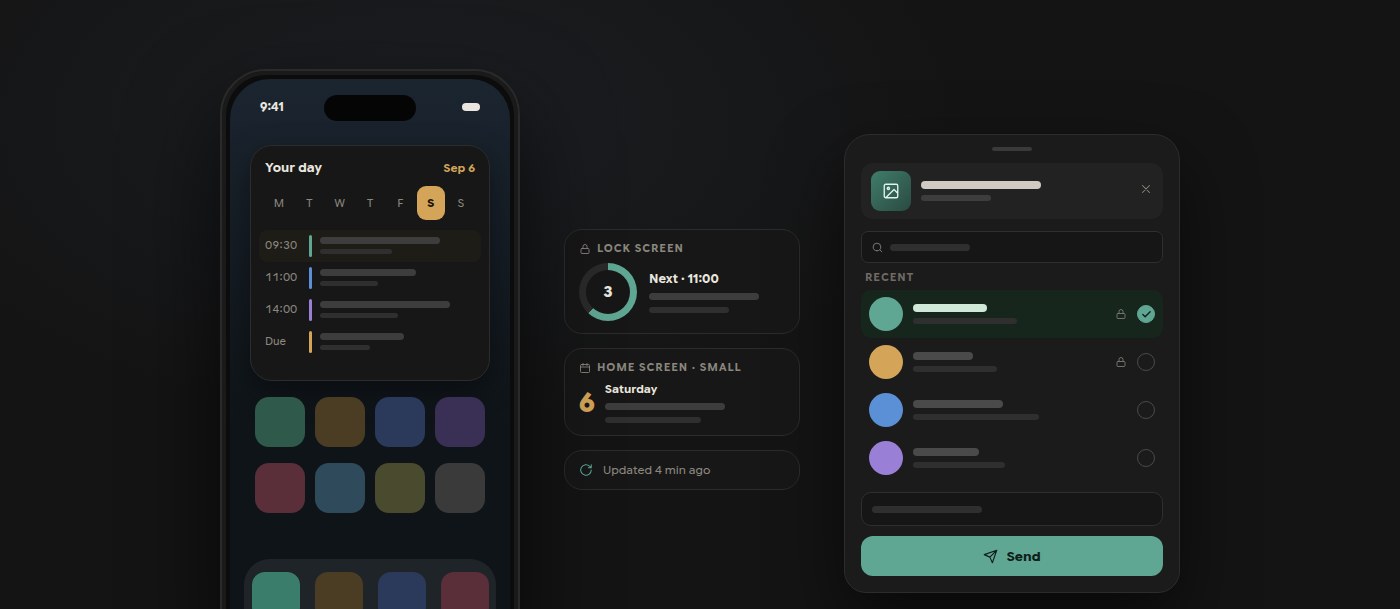
Polybase mobile now puts the day on the Home Screen. Native widgets on Android and iOS show a 14-day snapshot of visible meetings and assigned, unfinished tasks: an Android agenda that scrolls and switches days, small to extra-large iOS widgets, and iOS Lock Screen variants for the next event and today's count. They follow the app's language, palette and timezone, never read the device calendar and need no calendar permission. A background refresh keeps them current without opening the app.
Sharing into Polybase from another app no longer ends with a second question. On iOS, the share extension shows recent conversations with search, a message field and Send; on Android, recent conversations appear as Direct Share targets. The chosen conversation travels with the files, so the upload starts immediately.
Documents got the same attention. Spreadsheets and PowerPoint files open inside the app through an embedded viewer with pinch-zoom and slide swiping, and Office attachments in chat, tasks and meetings open in place instead of the download screen. Chat attachments render like the web app, the realtime stream recovers anything it missed, and calls on mobile keep a stable tile order, allow pinch-zoom on shared screens and offer switch or busy replies when a second call arrives.
- Android and iOS Home Screen widgets with a 14-day agenda; iOS Lock Screen widgets
- No device-calendar access or permission required
- Pick the recipient inside the iOS share sheet or Android Direct Share
- Spreadsheet and PowerPoint viewers embedded in the app
- Switch or busy-reply when a call arrives during another call