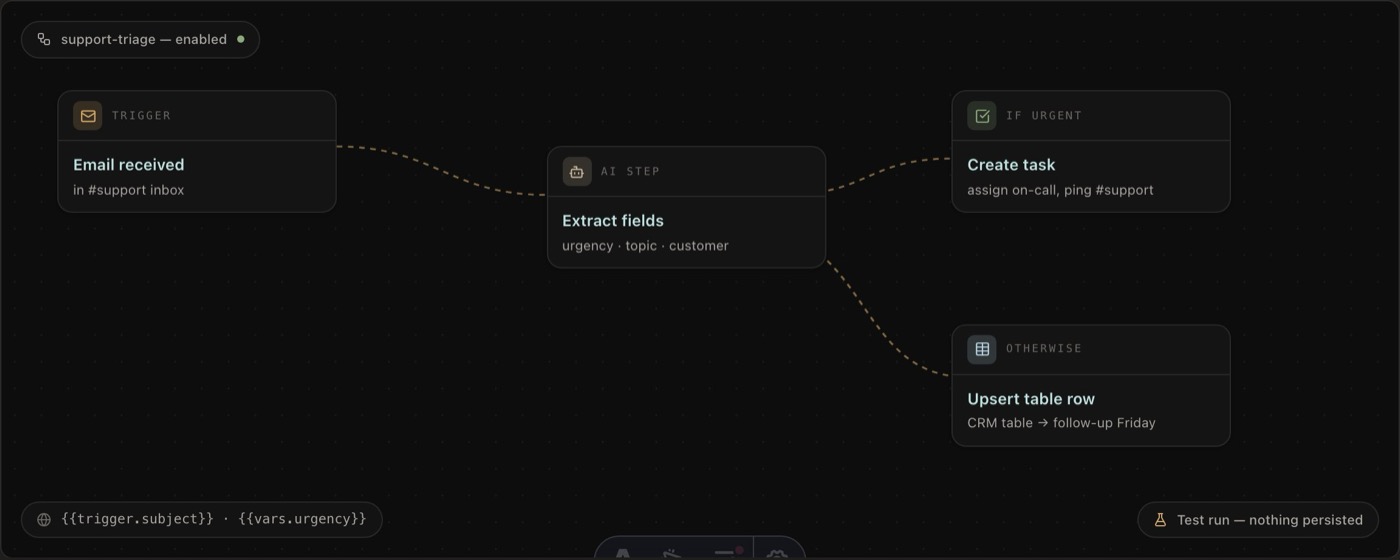
Flows, Polybase's workflow automation module, now has a visual builder: automations are designed on a node-graph canvas — trigger, steps and branches laid out as connected nodes — instead of written as configuration.
Automation logic likes to hide; behind a wall of settings it is hard to see what a workflow actually does. On the canvas, the shape of the flow is the documentation: conditions fork into named branches, loops and delays are visible steps, and variables like {{trigger.title}} flow between nodes.
Because everything lives in one platform, everything can start a flow: a task changes status, a message is posted, a table row is created, an email lands in the channel inbox, a meeting is scheduled, a webhook arrives from GitHub or HubSpot — or simply a schedule fires. Flows can also be run manually, and a single flow can have several triggers.
Steps cover the platform: send messages and email, create and update tasks, write table rows, and call any external API through an HTTP request node. A built-in AI step can summarise, extract structured fields or make a decision mid-flow — with an explicit tool policy under your control.
Before a flow goes live, a test run executes it end to end without persisting anything, and every run keeps a per-node trace of inputs, outputs and warnings — so "what did the automation do?" has an answer.
Flows runs wherever your Polybase runs. Self-hosted teams keep their automations — triggers, data and AI steps included — on their own infrastructure.
- Node-graph canvas with branching, for-each loops, delays and variables between steps
- 13+ trigger types: tasks, messages, table rows, email, calendar, webhooks and schedules
- Built-in AI step with structured output and a tool policy you control
- Actions across the platform plus an HTTP request node for external APIs
- Dry-run test mode and run history with per-node traces